



Network capturing is a fundamental process in cybersecurity and network diagnostics, involving the interception and analysis of data packets as they move across a network. Tools like Wireshark and TShark are at the forefront of this practice, empowering network administrators, security professionals, and developers to monitor traffic, troubleshoot issues, and understand how systems communicate.
In this blog, we will delve into capturing network traffic using both Wireshark (a graphical interface) and TShark (a command-line equivalent). Along the way, we will highlight real-world examples of session decoding and attack detection, while discussing the inherent risks posed by unencrypted protocols.
Network Layers and Capturing Traffic
When a user interacts with an application that sends or receives data, they are engaging at the application layer of the OSI model. However, network traffic moves through multiple layers as it traverses between the client and the server. Wireshark enables you to capture this traffic, allowing for deep inspection of the different layers.
Wireshark captures traffic at various OSI layers, including:
- Layer 2: Data Link Layer (Ethernet frames)
- Layer 3: Network Layer (IP packets)
- Layer 4: Transport Layer (TCP/UDP segments)
- Layer 7: Application Layer (HTTP, DNS, etc.)
By analyzing the traffic across these layers, you can uncover valuable details about the nature of the communication.
Example 1: Decoding a Session with Wireshark
Let’s walk through decoding a simple HTTP session using Wireshark.
Capture the Traffic
- Open Wireshark (GUI) and begin capturing traffic on the desired network interface.
- In your browser, visit an HTTP website (e.g., http://siteurl.com).
Filter for HTTP Traffic
Once the capture is complete, use the filter http to isolate relevant traffic. This helps to narrow down the capture, showing only HTTP packets, and allowing you to focus on requests and response.


Examine the Packets
Select any packet to view its details. You will see request methods (e.g., GET or POST), response status codes (e.g., 200 OK), and session details such as the URL requested and cookies. This provides deep insight into the traffic flow and the data exchanged between client and server.
TShark Equivalent
TShark offers similar functionality through the command line. To capture and filter HTTP traffic, use the command:
For AlmaLinux (or any RHEL-based distribution like CentOS):
# sudo dnf install wireshark-cli
For Debian/Ubuntu:
# sudo apt install tshark
Then issue the command to filter the traffic:
# tshark -i <eth0 or the specific interface you want to capture> -Y http -w capture.pcap
This command saves the capture to a file (capture.pcap) for further analysis.
Analysis
One of the primary risks of using unencrypted protocols like HTTP is that sensitive information—such as credentials and cookies—can be exposed in plain text. Attackers can easily capture and read this data, leading to potential breaches.
Example 2: Identifying a Denial of Service (DoS) Attack
A common network attack is the SYN flood, a type of DoS attack. In this example, we will detect such an attack using Wireshark.
Capture the Attack
A SYN flood involves an attacker sending numerous SYN packets to initiate TCP handshakes but never completing them. Begin capturing traffic on your network interface.
Filter for TCP SYN Packets
Use the following Wireshark filter to isolate TCP SYN packets:
tcp.flags.syn == 1 and tcp.flags.ack == 0

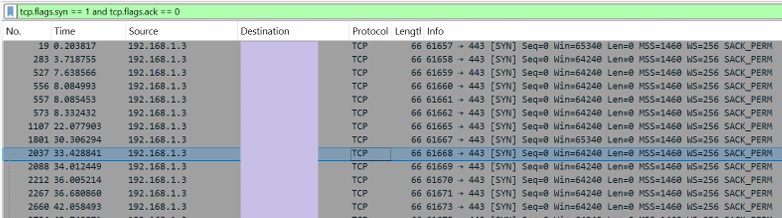
This filter helps you focus on packets where the SYN flag is set but the ACK flag is not, indicating incomplete handshakes.
Analyze the IPs
Look for an unusually high number of SYN packets from a single source IP. This is a tell-tale sign of a SYN flood attack, as the target server becomes overwhelmed by the incomplete connection attempts.
TShark Equivalent
For TShark, use the following command to analyze the capture and identify the source of the SYN flood:
# tshark -r capture.pcap -Y “tcp.flags.syn==1 and tcp.flags.ack==0” -T fields -e ip.src -e tcp.dstport | sort | uniq -c | sort -n
This command filters SYN packets, extracts source IP addresses and destination ports, and sorts them by frequency, making it easy to spot anomalies.
Analysis
By inspecting the captured packets, you can identify the attacking IP addresses, the target ports, and the overall scale of the attack. Responding to such insights can help mitigate the impact of the attack and protect network resources.
The Risks of Unencrypted Protocols
Unencrypted protocols such as HTTP, FTP, and the usage of Telnet expose sensitive data that can be easily captured by malicious actors using tools like Wireshark or TShark. With the ability to view credentials, session tokens, and other private information in plain text, attackers can exploit these weaknesses for man-in-the-middle attacks, credential theft, or session hijacking.
Effects
Capture HTTP/FTP/Telnet/SNMP/DB traffic to get passwords. No introduction is certainly needed for the Hypertext Transfer Protocol (HTTP). It usually works on port 80/TCP, and as it is a text protocol, it does not give the communication parties much or no privacy. Anyone who’s able to communicate can catch everything, including passwords, via that channel.
While all major browser vendors have made considerable efforts to prevent the use of HTTP as far as possible, during penetration testing, HTTP can be used on internal media. Here is an example of login credentials captured in a POST request in an HTTP communication:
Demonstration using Wireshark

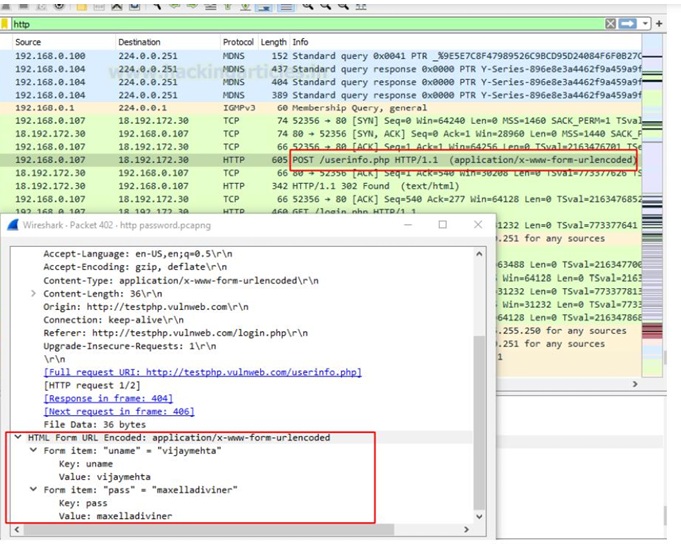
The above capture from Wireshark clearly indicates a password being intercepted. Similarly, capturing traffic for insecure protocols like HTTP, FTP, Telnet, SNMP v1/v2c, and unencrypted database connections clearly demonstrates the risk of transmitting sensitive information without encryption.
Secure Alternatives
Secure alternatives such as HTTPS, FTPS/SFTP, SSH, SNMP v3, and SSL/TLS for database communication protect this data by encrypting it, making it inaccessible even when intercepted.
References
• https://www.hackingarticles.in/network-packet-forensic-using-wireshark/
• https://www.hackingarticles.in/wireshark-for-pentester-password-sniffing/